Nuffnang

Thursday, January 19, 2012

Package Software With Installaware Studio For Windows Installer

By:


Photo: imageshack.us

One of the most important steps of software production is making the final installation package that makes it quick and easy for your customers to install your software. InstallAware Studio for Windows Installer makes this possible by providing you with the essential tools that you need for presenting and packaging your software in a professional and efficient way. Windows Installer is one of the most common mediums for packaging and installing software and this solution provides developers with the tools they need to meet proper installation standards. InstallAware Studio for Windows Installer provides hybrid installation technology which is unique in the world of installation package designers. It overcomes the barriers normally set in place by the limitations of Windows Installer to make your installations faster and more reliable. This helps to minimize the risk of corrupted installation files and other installation issues.

InstallAware Studio provides a simpler way of building setup packages thanks to its powerful MSI code. It simplified development and transparently manages the Windows Installer Conditions in addition to installer sequences and parameters. To make things easier for novice users as well as professionals, the setup language is human readable and requires a minimal learning curve to get to know. The whole process is far more user-friendly than many of the other solutions. You can configure your installation packages through the use of user-friendly dialogues without any necessity for programming skills.

InstallAware Studio for Windows Installer adds a great deal of extra features to the standard Windows Installer engine such as support for installation on demand, resiliency, advertising integration and privilege installation.

InstallAware Studio supports Windows 7 as well and no extra components are needed to create installation packages that are perfectly optimized for Microsoft's latest operating system. It's also possible to take advantage of the fact that, these days, most computers use 64-bit operating systems on 64-bit processors. Creating 64-bit setup packages has never been so straightforward. Hybrid installation technologies also make it more convenient for making packages for both 32-bit and 64-bit editions of Windows. It's convenient to have a hybrid installation package, since your customers will no longer need to choose which version to download. Everything can be stored in one package and the correct version can be installed automatically. The user doesn't even need to know whether they are running a 32-bit or a 64-bit system.

InstallAware Studio provides various support options to make your software packages versatile and reliable with maximum support for different editions of Windows and different installation standards. MSI support is also included and group policy management features are provided too. No dependencies are required either, so your customers do not need to worry about installing anything else in addition to your installation package. Installation on demand features are available for cutting down on installation times and more.

InstallAware Studio for Windows Installer is packed full of features that you need to enjoy professional-quality results in minimal time with minimal effort required. Learn more about how the software works at http://www.installaware.com.

Wednesday, January 18, 2012

How To Set Up a Computer Is Not a Difficult Task

By

Photo: assets.gcflearnfree.org

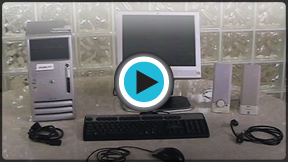
As important as owning a computer is the important task of how to manage and run it. Setting up a computer is not difficult and you can take the help of specialized technicians who will help you at every stage of the journey. A computer consists of several components which need to be working in harmony for the system to be functioning efficiently. It is through these components working together in harmony that there can be the satisfied computer user.
You can take the help of specialized services for a whole range of services on computers such as online tech support services that are provided by technical service providers such as HCL Touch provides and which include:
  • Hardware and software setup
  • Support to firewall setup
  • On time services
  • Online diagnoses and fixing the problem immediately
  • Assistance to remove all the infections, viruses, spywares malwares etc. from your computer.
  • Defragmentation of your Hard disk
  • Installation and setup of other devices
  • Quick admission to our technicians
  • Improving internet speed
  • Help in installation and setup of wireless networks
  • Online services
  • Improves your computer speed
  • Supports the printer
  • Technical care is now available at very nominal rates
New computer install need not be an intimidating process. All it takes is a broad awareness of IT related issues and the rest is a matter of networking with computer technical services provided by leading technical service providers such as HCL Touch or by taking the assistance of technicians.
You might face software setup issues which might be online or onsite issues. It is easily possible to resolve such issues by taking special help through compartmentalizing IT issues and preventing one software problem from causing subsequent problems. For example if you have a crash or disc failure in an equipment it may crash the entire system at least until the IT support team is able to fix matters. Your IT support team can isolate problems through efficient networking. Technical issues are in fact not irresolvable and involve getting the best mix of online and onsite IT support.
You can also easily fix computer problems by taking specialized technical support services. Such problems might manifest themselves in different ways such as the Blue Screen of Death or blank monitors to other issues such as program corruption or application corruption. IT issues involve strategies which can be worked out by skilled personnel with proper training.
How to set up a computer is a pretty straightforward process which is not difficult provided you take proper backup facilities. It involves the connection of different subsystems into a comprehensive whole to give the best results by ensuring that different electronic systems work in tandem to one another without interfering with each other. This can also be called systems harmonization.
Cathy Stones is associated with computer support specialist from several years anyone looking for a professional computer technical support, try the remarkable services offered by online computer tech support service providers HCL Touch. They provide efficient and prompt services 24x7.
Article Source: http://EzineArticles.com/?expert=Cathy_Stones

Article Source: http://EzineArticles.com/6819997

Tuesday, January 17, 2012

Attain Four Key Objectives With Inventory Management Software

By:


Photo: bplans.com

Inventory management is one of the prime elements that arrest the attention of organizations. To maintain good inventory levels is the first best measure to capture good market share, which can be accomplished only through proper inventory control management. A company that looks to take better control of inventory management is sure to get benefited by using inventory management software. Studded with rich features, and programmed to perform various functions, this tool helps organizations to accomplish four main tasks that become a part of the inventory control management procedures.

Stock up products in demand
A company that introduces different products to cater to the demands of target audience will also have a set of fast-moving items that emerge as market leaders and become sought products among customers. An establishment that wants to make sure that the fast-moving products are available at all times should have good control over inventory management procedures. The software designed to aid inventory management procedures allows organizations to separate fast-moving items from other products, and guide establishments to stock up products that enjoy good demand amid customers.

Get good space control
Having good space control at the warehouse is a significant aspect that can help organizations gain good control over inventory levels. Providing space for products that do not have good demand in the market is to waste an opportunity in creating space for fast-moving products. With the aid of inventory management software, a company can glean details about products, as well as about the pull exerted by products in the market, and about profits romped in by specific products. With such relevant details, a company can make good use of the warehouse space, stock the right products, and increase profits in the bargain.

Manage supplies
Maintaining proper inventory levels is just the beginning, as an establishment should be well prepared to handle supplies in a proper manner. This tool that is built to enhance inventory management procedures helps establishments to manage supplies in a better way, and to provide supplies in a timely manner as in a way that a product reaches a customer at the right time.

Win customer confidence
To gain reputation, an organization should supply the right product, and should supply the product at the right time to a customer. The software that automates inventory management procedures makes sure that right products are shipped at the right time, as the organization gains the trust and confidence of end users. Managing inventory in the best possible way, earning customer confidence, and maximizing profits are made easy and effective with this tool.

When the inventory management software becomes an integral part of an organization, four prime tasks get done to perfection, as the establishment is well placed to enhance its bottom line.

Article Source: http://www.articlesnatch.com

About the Author:
For More Details about this article click these links:- Inventory Management Software and Mobile Workforce Managemen

Sunday, January 15, 2012

Norton Internet Security 2012 Review

By


Photo:  whatisthebestantivirus.org

Norton Internet Security 2012 is the latest security software product from Symantec. It is packed with features to protect your PC from all kinds of online threats and the main programs in this award-winning software are antivirus, anti-spyware, firewall and antispam protection.
However, Norton Internet Security is not just an online protection program. It is designed to also shield your computer from other threats that aren't spread through the Internet. For example, many external media drives like flash disk drives and hard drives are known to easily transmit malware threats like viruses, Trojans and spyware. And many people use these devices to transfer files and carry personal information that can be destroyed by viruses on these devices.
Norton Internet Security 2012 has been tested by many of the leading test labs. Symantec has submitted it to AV-Test and AV-Comparatives and the results shown have been impressive. In the AV-Comparatives protection test for example, Norton scored the highest at 99.3% beating the world's leading Internet security product, BitDefender at 99.1%. This crucial test shows that Norton has an exceptionally high protection rate against all forms of malware (malicious software) threats.
The AV-Test protection and repair tests on Norton were also impressive and the scores were high. But Norton surprisingly was not submitted to Virus Bulletin for testing; and it was one of the few not to submit its software to this highly esteemed test lab.
Norton Internet Security has a few drawbacks and some of these have stuck with it over the years. It has continued to lose ground to other security products like BitDefender and Kaspersky and that's mainly to do with its effectiveness and resource usage. But it still remains a leader in this field and we've included some of its most prominent pros and cons below:
Pros
1. Norton Internet Security provides protection for Android mobile phones
2. It's one of the few security products that provide social media protection on sites like Facebook. It has a Facebook link scanning feature which scans all links to check if they are free of malware and phishing attacks.
3. It protects both home and business networks from intrusions and hackers
4. It has many new features that provide excellent protection and they include parental controls, a two-way firewall, the silent mode and network monitoring.
5. Norton can create a bootable rescue disk which you use when your computer gets infected and can't start Windows.
Cons
1. Norton's test scores fell a bit short of the highest ranked antivirus products.
Summary
Overall, Norton Internet Security 2012 is a security software product with all the right features. It is also a leader in the fight against key loggers and other hacker systems that are designed to steal and destroy your personal data.
Visit Best Buy Antivirus to compare antivirus software and find the right one for your PC. We also have the Norton Internet Security review which includes other features and tools found in this leading software.
Article Source: http://EzineArticles.com/?expert=Mike_Ncube

Article Source: http://EzineArticles.com/6812298

Friday, January 13, 2012

Sap Business One Customization Or Modern Erp Interoperability Concept

 By:

Photo: vendor-showcase.com

In XX century especially in the era of supercomputers accounting application was something running it its own computing case and open to users via monitors, keyboards and printers. Then we see the appearance of such concepts as EDI, Barcoding, RFID and plus accounting application was renamed into ERP with Sales, Purchasing, Inventory Control, Manufacturing and Human Resource functionalities. Now think about such sales channel as ecommerce portal where shopping cart and credit card payment are transferred automatically into your accounting system. And another observation is about diversity in the way of doing business and business processes uniqueness as the advantage in the competition. All these are reasons for ERP software to become more and more flexible and ready for custom logic, tables and workflows. Twenty years ago in order to customize ERP system programmers had to obtain source code and do software development there and of course each new version was slashing the customization and it needed to be reapplied. In 1990th in such applications as Great Plains Dynamics the concept of dictionaries and customization distribution in the form of so-called chunk file improved the flexibility. SAP Business One goes even further with having business logic stored in the metadata which in turn sits in SQL database. Lets review how work could be done in SAP B1:

1.User Defined Tables and Fields. Traditionally in accounting applications developers provided so-called user defined fields already incorporated in the table structure. Lets imagine that for the customer record you need something unique to your business requirements for example the field Hobbies. Not a problem and you just take user defined field one and assign it for hobbies record. However if you have control over metadata and it is hosted in SQL Server company database then why dont we just add field to existing table hosting business partner records? Lets hold on for a moment and compare this new architecture with the options available fifteen years ago. In Great Plains Dynamics metadata was stored in dictionary files and they were the engine for Dexterity to play the business logic. Dynamics.dic file stores core business logic even in modern Microsoft Dynamics GP. But it is operating system file and it is not something stored in SQL. In order to add new field in Dynamics GP you have to learn Dexterity IDE and add fields to new table linked to existing table in one-to-one relation via primary key. And now to Business One and the question are newly created fields are available immediately for Software Development Kit programming? The answer is they really are. User defined objects are often key elements in integration and reporting

2.Software Development Kit. This is where you do custom programming. Microsoft Visual Studio is recommended as code snippets available in VB.Net and C#. When you are coding integration consider several time related options. First one is simple DOS application that could be scheduled on Windows Server to run every night or maybe every half an hours. This scenario is often referred as quasi real time. In certain situations you need real time data transfer and that could be accomplished via SOAP XML Web Service project with SDK libraries. By the way web service could be called from non-Windows computer platform or in other words from Linux hosting PHP code and MySQL database. Linux is very popular in Ecommerce hosting

3.Providing Second Opinion. If you are reading this document then probably your software development project was screwed by somebody else. Feel free to appeal to second opinion as you got to have your business running

4.Please call us 1-866-304-3265, 1-269-605-4904, help@efaru.com. We have local presence in Chicagoland, Southern California, South West Michigan, Houston and Dallas areas of Texas. We serve customers USA and Canada nationwide and internationally via web sessions and phone conferences (Skype is welcomed)
Article Source: http://www.articlesnatch.com

About the Author:
Andrew Karasev is SAP BO consultant and Great Plains Certified Master, MVP, help@efaru.com 1-866-304-3265, 1-269-605-4904. He is also the initiator of eFaru project http://www.efaru.com and founder of Alba Spectrum information space

Thursday, January 12, 2012

Copying Your MPEG File Into DVD Format

By

Photo: fullandfree.info

You stare at an MPEG file sitting on your computer. You hold a blank DVD in your hand. Now what? It's important to understand that an MPEG is actually a video file that has been compressed. Now you just want to get the MPEG filed somehow onto your DVD. It depends what size your MPEG file is, but the transfer can usually happen in a matter of minutes on most standard computers.
(1) You will need to insert a recordable or a blank DVD into the DVD-ROM on the computer.
(2) There will be an automatic prompt appearing on your computer screen. It may take 15, or even 20, seconds for that prompt to automatically appear on your screen. Read the prompt and see what is asking you to do. It should be asking you what exactly it is you want to do with the DVD. Go ahead and select the options that says to burn your DVD.
(3) Give your DVD-burning program a chance to open. It depends on what kind of computer you have on which program it is that will open. It also depends on your computer software and the type of settings that are set as default.
(4) There should be an area that is blank that you are presented with where you can drag the files you need so they can be burned onto your DVDs. In some programs, the blank area will take up the majority of the area on the screen. In some of the other programs, that blank area will come in a different of form and look more like a narrow column. Be sure to drag your MPEG file into that blank area and you can do this by holding down on the mouse, then go ahead and let go of it once your file is actually in that blank area. Your MPEG should now be accessible to you and show up clearly in the area.
(5) Find the place to hit "Burn DVD" or whatever is the equivalent to that. Remember, things will differ from user to user depending on which computer and program you are using. Allow up to several minutes or maybe even longer, it all depends on the actual size of your MPEG, on how long it will take for your MPEG to burn into the DVD. You should be alerted by the DVD-burning program when the DVD is officially burnt. It might even pop out of the DVD-ROM for you!
Do you want to convert MPEG files to DVD format? Please visit our website to find perfect MPEG to DVD convertor.
Article Source: http://EzineArticles.com/?expert=Jaina_Wang

Article Source: http://EzineArticles.com/6809950

Wednesday, January 11, 2012

Why Should You Choose An Antivirus Software

By:

Photo: softdistrict.com

The Internet has today carved a niche into our everyday lives. From shopping to research, one uses the Internet for almost everything. One of the most important aspects for which the Internet is used is finding reviews about products and services. There are many products for which online reviews are available, like antivirus software for computers. Here are some tips that will help one looking for the best antivirus software reviews online.

1 Believe in Search Engines

Search engines have brought about a definitive change in the user behavior on the Internet. Today, the average netizen uses the search engine almost nonstop. There have been cases where even if people know the address of a particular domain name, they type it up in the Search Engine bar so that they are directly be taken to the website, even if there are some typographic errors. Therefore, it would not be very wrong to concede that searching for the best antivirus software reviews via search engines is a very good idea.

2 Check out the Websites

There are several websites that offer you antivirus software reviews, but very few of them offer you frank and unbiased reviews. If you have already landed on a website that is promising you the best antivirus software reviews, try to judge whether the website is a revenue-only website --a website that is built only to get affiliate income or pay per click income. The best way to do this is to read the reviews and try to check out the aspects pointed out in the website are true. You can do this by going through several electronics review websites, and compare the reviews on each of the website.

3 Look at the Legends

The Internet has been around for a long time now, and there are several websites that have made a name for themselves on the Internet. Basically, these websites are quite similar to a seminal and time honored newspaper or magazine, and take great pains to give technical, real reviews for the products, like antivirus software reviews. They carry out these reviews in great detail, and make it a point to keep a completely factual outlook in their article. If a particular product is best in class, they will mention it so. And of the product is the pits, they will definitely tell so. Therefore, it is a good idea to take a look at the older websites that are more or less industry legends and find out the Best Antivirus Software reviews. By doing good research on the internet, you will surely find the right website.

Article Source: http://www.articlesnatch.com

About the Author:
These are the three important points that you need to remember while looking for good Antivirus Software Reviews online. If you are not sure, you can search for them via a search engine, and you will sooner or later stumble on an authentic review website. You can even use social websites to look for other product reviews, including software reviews.